Zoom
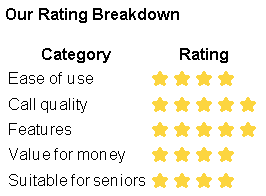
Zoom Review — The Best App for Group Family Video Calls Rating: ⭐⭐⭐⭐ 4/5
5/2/20262 min read


Our Verdict
Zoom is the best app for bringing a large group of family members together on one call — no matter what devices they use or where they are in the world. It is slightly more complicated to set up than WhatsApp or FaceTime, but once you know how it works it is extremely reliable and feature-packed.
What is Zoom?
Zoom is a video conferencing app that became a household name. It works on smartphones, tablets, and computers, and allows calls with large numbers of people at once — making it ideal for family gatherings, celebrations, and group catch-ups.
What We Like
Works on every device Zoom works on iPhone, Android, Windows computers, and Mac computers. This makes it the most versatile option when family members use different devices.
Large group calls Free Zoom calls support up to 100 participants — far more than any other free app. Perfect for big family gatherings.
Joining is easy You don't even need a Zoom account to join someone else's call. When a family member sends you a meeting link, just tap it and you're straight in.
Works on a computer browser On a computer you don't even need to install Zoom — you can join calls directly in your web browser.
Screen sharing During a call you can share your screen to show the other person photos, a website, or anything else on your device.
What We Don't Like
40 minute limit on free group calls Free Zoom calls with three or more people are limited to 40 minutes. This is the biggest drawback. You can start a new call straight after but it can feel disruptive.
Setting up a call is more complicated Starting your own Zoom call requires creating an account and sharing a meeting link. It is easier to join someone else's call than to set one up yourself.
Can feel overwhelming at first Zoom has more buttons and options than WhatsApp or FaceTime. It takes a little getting used to but becomes straightforward once you've used it a few times.
Who is Zoom Best For?
Zoom is ideal for you if:
You want to call a large group of family members at once
Your family uses a mix of iPhones, Android phones and computers
You are happy joining calls that someone else sets up
You want to share photos or your screen during calls
Final Verdict
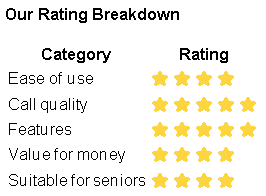
Zoom loses one star only because of the 40 minute limit and slightly more complex setup. For group family calls it remains the best option available — nothing else brings large groups together as reliably.
Want to get started? Read our step-by-step guide: How to Use Zoom[Read the Guide][Download PDF Guide]
Need help choosing the right app?
Browse our guides or get in touch — we're here to help.
get in touch
hello@softwareforseniors.co.uk
© 2026. All rights reserved.