WhatsApp Review — Is It the Best Free Calling App for Seniors? Rating: ⭐⭐⭐⭐⭐ 5/5
5/2/20263 min read


Our Verdict
WhatsApp is our top recommendation for seniors who want to make free video calls. It is the most widely used messaging app in the UK, works on any smartphone, and is completely free to use over Wi-Fi. If your family and friends are already on it — and the chances are most of them are — it is the obvious place to start.
What is WhatsApp?
WhatsApp is a free app owned by Meta (the same company that owns Facebook) that lets you make voice calls, video calls, send text messages, photos, and voice notes — all completely free over Wi-Fi. It works on both iPhone and Android phones, which means it doesn't matter what device you or your family use.
What We Like
Completely free over Wi-Fi Whether you're calling someone down the road or a family member on the other side of the world, WhatsApp calls are free as long as you're connected to Wi-Fi. No phone bills, no international charges.
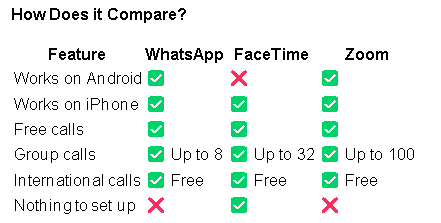
Works on any smartphone Unlike FaceTime which only works on Apple devices, WhatsApp works on iPhones and Android phones. This makes it ideal for families where people use different types of phones.
Simple to use Making a call on WhatsApp works just like making a normal phone call — you find the person's name, tap the video or phone icon, and wait for them to answer. Most people pick it up within a few minutes.
Voice messages If typing is difficult, WhatsApp lets you press and hold the microphone icon to record and send a voice message. This is a brilliant feature for anyone who finds typing on a small screen frustrating.
Group calls WhatsApp allows group video calls with up to 8 people at once — perfect for a family catch-up where everyone joins from different locations.
Already on your family's phones The biggest advantage of WhatsApp is that most people in the UK already have it. You won't need to convince family members to download something new.
What We Don't Like
Requires a mobile number WhatsApp only works with a mobile phone number — you can't sign up with just an email address. This isn't a problem for most people but is worth knowing.
Uses mobile data if not on Wi-Fi If you make calls without being connected to Wi-Fi, WhatsApp will use your mobile data allowance. Always connect to Wi-Fi first to avoid unexpected charges.
Lots of notifications WhatsApp can send a lot of notifications — messages, calls, and group chat alerts. Some people find this overwhelming at first, but you can easily adjust notification settings once you're set up.
Who is WhatsApp Best For?
WhatsApp is ideal for you if:
Your family and friends already use it
You have an Android phone
You want to call people abroad for free
You want one app that does everything — calls, messages and photos
Final Verdict
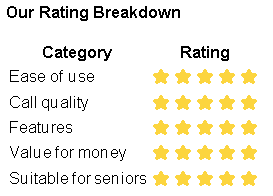
WhatsApp earns its five star rating because it does everything you need, works on any phone, and is already used by most of the people you want to call. If you only download one app from this list — make it WhatsApp.
Want to get started? Read our step-by-step guide: How to Use WhatsApp [Read the Guide] [Download PDF Guide]
Need help choosing the right app?
Browse our guides or get in touch — we're here to help.
get in touch
hello@softwareforseniors.co.uk
© 2026. All rights reserved.